Over the past six months, we noticed a massive shift in how our power users interacted with our B2B SaaS platform. Instead of logging into our web dashboard to filter analytics, export CSVs, or trigger automated workflows, they wanted their AI assistants — Cursor, Claude Desktop, Windsurf, or internal enterprise LangGraph agents — to perform these actions directly from their natural language workflows.
The Traditional Dilemma: We initially considered building custom ChatGPT plugins, Claude tool definitions, and standalone webhook bots. But maintaining separate bespoke integrations for every emerging AI client is an architectural dead end. Model Context Protocol (MCP) solved this by providing an open, unified standard to expose our SaaS tools, resources, and contextual prompts once — compatible with any AI client everywhere.
Why MCP Over Traditional REST / OpenAPI for AI Agents
A common question engineering teams ask is: 'We already have a REST API and an OpenAPI Swagger spec. Why can't LLMs just consume our raw REST endpoints?'
In practice, feeding a raw REST OpenAPI spec to an LLM creates severe production bottlenecks:
- Context Window Bloat: Standard REST endpoints return verbose payloads (pagination headers, nested metadata, unneeded relational IDs) that burn thousands of precious tokens per query.
- Statelessness & Protocol Mismatch: REST lacks a standardized bidirectional streaming protocol for AI agent tool negotiation, runtime capability discovery, and live progress callbacks.
- Brittle Error Recovery: When an AI model calls a REST endpoint with malformed parameters, standard 400 Bad Request responses don't give the LLM structured, self-healing correction context.
- MCP Protocol Standard: Model Context Protocol standardizes tool definitions (JSON Schema / Zod), read-only resources (URIs like saas://tenants/workspace-1/metrics), and dynamic prompts into a single lightweight JSON-RPC 2.0 contract.
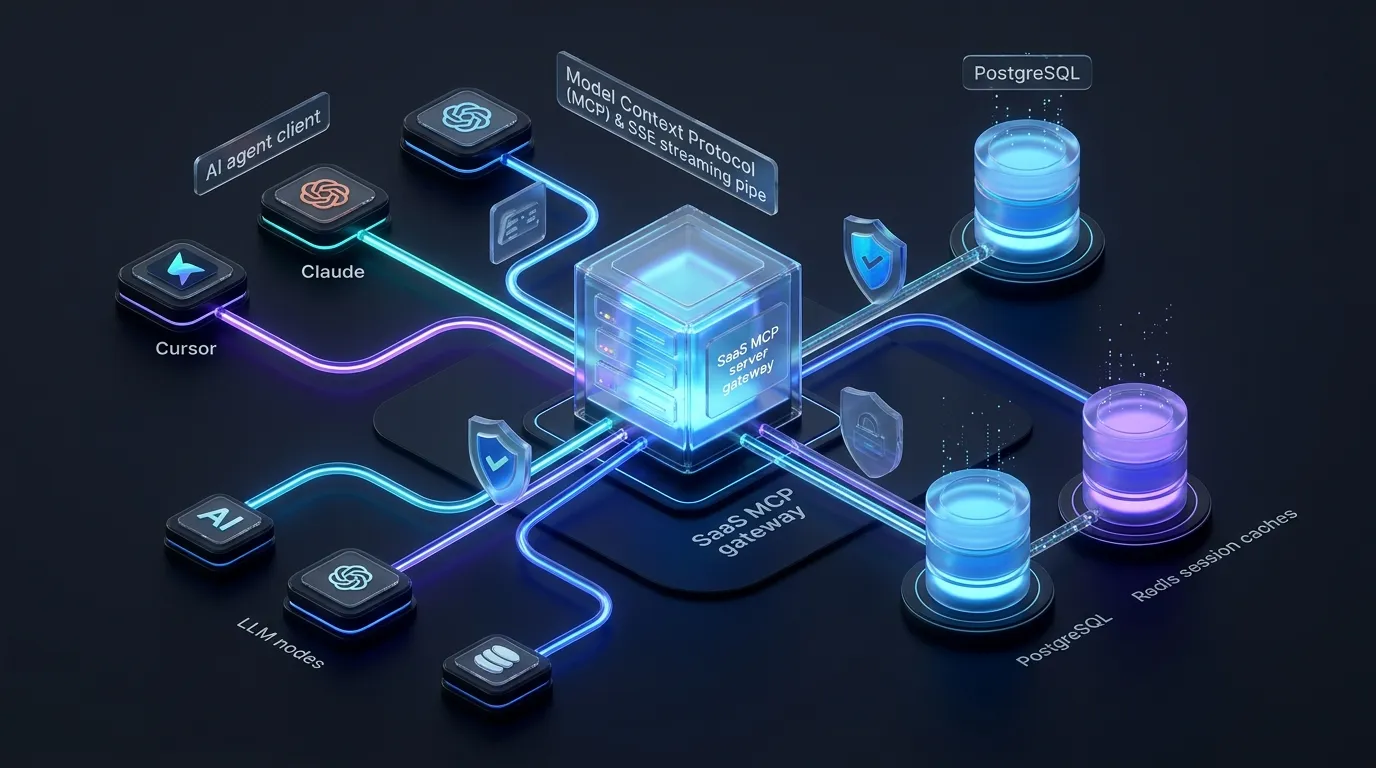
1. The Transport Layer: Why Stdio Fails for Cloud SaaS (And Why You Need SSE)
Most beginner tutorials demonstrate MCP using `stdio` transport, where the host application (like Claude Desktop) spawns a local child process (e.g. `node server.js` or `python main.py`) and communicates via standard input/output pipes. This is great for local developer CLI tools, but completely impossible for a multi-tenant cloud SaaS.
For a cloud-hosted SaaS, clients connect remotely over HTTPS. We implemented the Server-Sent Events (SSE) remote transport specification with a dual-endpoint architecture:
- GET /api/mcp/sse: The client initiates an HTTP GET request with a persistent SSE connection. The SaaS server assigns a unique `sessionId` and streams an endpoint event informing the client where to post messages.
- POST /api/mcp/message?sessionId=...: The client sends JSON-RPC 2.0 requests (e.g., `tools/list`, `tools/call`, `resources/read`) to this HTTP POST endpoint. The server processes the request and streams the result back over the active SSE channel.
// High-Level SSE Transport Lifecycle in Node.js / Next.js API Routes
// 1. Client opens persistent event stream:
// GET https://api.your-saas.com/v1/mcp/sse
// Headers: Authorization: Bearer mcp_sk_live_xxxx
//
// Response Stream:
// event: endpoint
// data: /v1/mcp/message?sessionId=sess_8f9a2c1b4e
//
// 2. Client invokes a tool via JSON-RPC POST:
// POST https://api.your-saas.com/v1/mcp/message?sessionId=sess_8f9a2c1b4e
// Body: { "jsonrpc": "2.0", "id": 1, "method": "tools/call", "params": { "name": "get_workspace_metrics", "arguments": { "timeframe": "7d" } } }
//
// 3. Server validates Auth, checks Tenant RLS, executes query, and streams the response over SSE.2. Multi-Tenant Authentication & Session Isolation
In a multi-tenant B2B SaaS, security is non-negotiable. An AI agent must never be able to access or mutate data belonging to another customer's organization. We implemented a three-tier security model:
- 01Dedicated MCP API Keys (mcp_sk_live_...): Generated in the SaaS workspace settings. Each key is cryptographically hashed (SHA-256) and permanently bound to a specific `tenant_id`, `user_id`, and granular RBAC role (e.g., `read_only_analytics`, `workflow_admin`).
- 02Session Registry in Redis: Because HTTP requests can hit any distributed serverless worker or container instance, active SSE sessions are indexed in Redis with a 15-minute TTL and automatic heartbeat refreshes.
- 03Row-Level Security (RLS) Context Injection: Every MCP tool handler receives an authenticated context containing the validated tenant and user identity. Database queries automatically bind `tenant_id` at the ORM/SQL level.
import { NextRequest } from "next/server";
import { db } from "@/lib/db";
import { redis } from "@/lib/redis";

export interface AuthenticatedMcpContext {
  tenantId: string;
  userId: string;
  role: string;
  scopes: string[];
}

export async function validateMcpAuth(req: NextRequest): Promise<AuthenticatedMcpContext> {
  const authHeader = req.headers.get("authorization");
  const apiKey = authHeader?.startsWith("Bearer ") ? authHeader.substring(7) : null;

  if (!apiKey || !apiKey.startsWith("mcp_sk_")) {
    throw new Error("UNAUTHORIZED: Missing or invalid MCP API Key");
  }

  // Hash key to prevent timing attacks and lookup in PostgreSQL
  const hashedKey = crypto.createHash("sha256").update(apiKey).digest("hex");

  const tokenRecord = await db.mcpApiKeys.findFirst({
    where: { keyHash: hashedKey, revokedAt: null },
    include: { tenant: true, user: true },
  });

  if (!tokenRecord) {
    throw new Error("FORBIDDEN: Invalid or revoked MCP token");
  }

  // Update last used timestamp asynchronously
  await db.mcpApiKeys.update({
    where: { id: tokenRecord.id },
    data: { lastUsedAt: new Date() },
  });

  return {
    tenantId: tokenRecord.tenantId,
    userId: tokenRecord.userId,
    role: tokenRecord.user.role,
    scopes: tokenRecord.scopes, // e.g. ["analytics:read", "campaigns:write"]
  };
}3. Complete Production Implementation: Building the MCP Server
Here is the exact production architecture we built using the official `@modelcontextprotocol/sdk` on top of our TypeScript backend. It defines the SSE transport endpoint and maps incoming JSON-RPC messages to our business logic layer.
// server/mcp/server.ts
import { McpServer } from "@modelcontextprotocol/sdk/server/mcp.js";
import { SSEServerTransport } from "@modelcontextprotocol/sdk/server/sse.js";
import { z } from "zod";
import { db } from "@/lib/db";
import { type AuthenticatedMcpContext } from "./auth";

export function createTenantMcpServer(ctx: AuthenticatedMcpContext) {
  const server = new McpServer({
    name: "Enterprise-SaaS-MCP-Gateway",
    version: "2.1.0",
  });

  // TOOL 1: Query Aggregated Workspace Analytics (Token-Optimized)
  server.tool(
    "get_workspace_analytics",
    {
      timeframe: z.enum(["24h", "7d", "30d", "90d"]).describe("Analytics aggregation window"),
      metrics: z.array(z.enum(["active_users", "revenue", "churn_risk", "conversion_rate"]))
        .describe("Specific metrics to fetch (avoids returning unnecessary fields)"),
    },
    async ({ timeframe, metrics }) => {
      // Tenant isolation strictly enforced via authenticated context
      const analyticsData = await db.analyticsEvents.aggregateMetrics({
        tenantId: ctx.tenantId,
        timeframe,
        metrics,
      });

      return {
        content: [
          {
            type: "text",
            text: JSON.stringify({
              status: "success",
              workspaceId: ctx.tenantId,
              timeframe,
              data: analyticsData,
            }, null, 2),
          },
        ],
      };
    }
  );

  // TOOL 2: Mutating Action with Confirmation & Guardrails
  server.tool(
    "trigger_automated_campaign",
    {
      campaignName: z.string().min(3).max(100),
      targetAudienceSegmentId: z.string().uuid(),
      dryRun: z.boolean().default(true).describe("If true, simulates action without sending emails"),
    },
    async ({ campaignName, targetAudienceSegmentId, dryRun }) => {
      // Enforce write permissions
      if (!ctx.scopes.includes("campaigns:write")) {
        throw new Error("Permission Denied: Your API key lacks 'campaigns:write' scope.");
      }

      if (dryRun) {
        const estimatedReach = await db.audienceSegments.countMembers(ctx.tenantId, targetAudienceSegmentId);
        return {
          content: [
            {
              type: "text",
              text: `[DRY RUN SIMULATION] Campaign '${campaignName}' would target ${estimatedReach} customers. Set dryRun: false to execute.`,
            },
          ],
        };
      }

      const jobId = await db.campaignJobs.create({
        tenantId: ctx.tenantId,
        triggeredByUserId: ctx.userId,
        campaignName,
        targetAudienceSegmentId,
      });

      return {
        content: [
          {
            type: "text",
            text: `Successfully queued live campaign execution (Job ID: ${jobId}). Real-time logs available at /dashboard/campaigns/${jobId}`,
          },
        ],
      };
    }
  );

  // RESOURCE: Read-only live schema specification
  server.resource(
    "saas_workspace_profile",
    "saas://workspace/profile",
    async (uri) => ({
      contents: [
        {
          uri: uri.href,
          text: JSON.stringify({
            workspaceId: ctx.tenantId,
            tier: "Enterprise Pro",
            activeIntegrations: ["Stripe", "Slack", "PostgreSQL", "HubSpot"],
          }),
        },
      ],
    })
  );

  return server;
}4. Connecting the SSE Route Handlers (Express / Next.js)
To tie the server and transport together, we expose two HTTP routes. The SSE handler instantiates the `SSEServerTransport` and stores active connection mappings in memory or distributed state.
// app/api/mcp/sse/route.ts
import { NextRequest } from "next/server";
import { SSEServerTransport } from "@modelcontextprotocol/sdk/server/sse.js";
import { validateMcpAuth } from "@/server/mcp/auth";
import { createTenantMcpServer } from "@/server/mcp/server";

// In-memory or Redis transport cache for active SSE streams
const activeTransports = new Map<string, { transport: SSEServerTransport; server: any }>();

export async function GET(req: NextRequest) {
  try {
    const authContext = await validateMcpAuth(req);

    // Create new SSE transport connected to /api/mcp/message
    const transport = new SSEServerTransport("/api/mcp/message", req as any);
    const mcpServer = createTenantMcpServer(authContext);

    await mcpServer.connect(transport);
    const sessionId = transport.sessionId;

    activeTransports.set(sessionId, { transport, server: mcpServer });

    // Handle cleanup on connection close
    req.signal.addEventListener("abort", () => {
      activeTransports.delete(sessionId);
    });

    return new Response(transport.responseStream, {
      headers: {
        "Content-Type": "text/event-stream",
        "Cache-Control": "no-cache, no-transform",
        "Connection": "keep-alive",
      },
    });
  } catch (error: any) {
    return new Response(JSON.stringify({ error: error.message }), { status: 401 });
  }
}

// app/api/mcp/message/route.ts
export async function POST(req: NextRequest) {
  const sessionId = req.nextUrl.searchParams.get("sessionId");
  if (!sessionId || !activeTransports.has(sessionId)) {
    return new Response("Session not found or expired", { status: 404 });
  }

  const { transport } = activeTransports.get(sessionId)!;
  await transport.handlePostMessage(req as any);
  return new Response("OK", { status: 200 });
}5. How Customers Configure Their AI Clients (Cursor & Claude Desktop)
Once the MCP endpoint is deployed, SaaS users configure their AI desktop or IDE environments. In Claude Desktop (`claude_desktop_config.json`) or Cursor's MCP Settings, they add the remote endpoint:
{
  "mcpServers": {
    "my-saas-platform": {
      "command": "npx",
      "args": [
        "-y",
        "mcp-remote-client",
        "https://api.your-saas.com/api/mcp/sse",
        "--header",
        "Authorization: Bearer mcp_sk_live_89f0293847291a0b"
      ]
    }
  }
}
Once connected, the user can ask Claude or Cursor natural questions:
User: 'What was our user churn rate over the past 30 days, and what are the top 3 drop-off reasons in our analytics?' AI Agent: Calls `get_workspace_analytics(timeframe: '30d', metrics: ['churn_risk'])` -> Analyzes SaaS JSON response -> Returns a pristine executive summary with actionable retention advice in seconds.
6. Production Pitfalls & Hard-Won Lessons
Shipping an MCP server in production exposed several challenges you don't encounter in local tutorials. Here are the four biggest lessons we learned:
- 011. Token Throttling & Truncation: AI models can easily be overwhelmed if a tool returns a 5MB database dump. Always paginate, sort by relevance, and summarize large collections before returning string content to the MCP transport.
- 022. Guarding Against AI Agent Retry Loops: Autonomous agents (like ReAct or LangGraph loops) can occasionally get stuck in infinite execution loops, hammering your database with 50 calls per second. We implemented token-bucket rate limiting per `sessionId` (maximum 30 tool calls per minute).
- 033. Destructive Action Confirmation (Dry-Run by Default): For dangerous mutations (deleting data, sending bulk customer emails), tools should always default to `dryRun: true`. The agent returns a preview and explicitly requests confirmation before executing with `dryRun: false`.
- 044. Comprehensive Audit Logging: Every tool execution is logged with `tenant_id`, `user_id`, `tool_name`, `arguments`, execution duration, and caller IP for enterprise SOC2 compliance and observability.
Summary & Architecture Blueprint
Adding an MCP server to an existing SaaS isn't about rewriting your backend — it's about exposing your existing business logic and database queries through a standardized, secure JSON-RPC interface that any AI model can safely understand. By moving from bespoke custom integrations to MCP, you future-proof your SaaS for the next decade of autonomous AI workflows.
Frequently Asked Questions
Why use MCP instead of standard REST API endpoints for AI tools?
MCP standardizes tool definitions, dynamic resources, prompts, and streaming bidirectional execution in a single protocol. Unlike raw REST APIs that return verbose unstructured payloads, MCP tools provide strict JSON schemas, token-optimized data formatting, and native support across Claude, Cursor, and multi-agent frameworks without custom client glue code.
Can an MCP server run in serverless platforms like Vercel or AWS Lambda?
Yes, provided the transport uses HTTP/SSE. Because serverless functions have execution time limits and ephemeral memory, you should maintain session metadata in Redis and leverage streaming edge handlers with keep-alive pings to keep the SSE connection alive during long agent interactions.
How do you enforce multi-tenant isolation and security?
Authentication is verified upfront via scoped Workspace API Keys (`mcp_sk_...`). The validated tenant and user ID are injected into the server execution context, ensuring all database queries strictly enforce PostgreSQL Row-Level Security (RLS) and RBAC role boundaries.
What happens if a tool returns too much data for the LLM context window?
Large tool responses will degrade LLM reasoning and burn tokens rapidly. Best practice is to design MCP tools that aggregate, filter, and paginate data server-side, returning concise structured summaries rather than raw database dumps.
How do you protect against destructive mutations executed by autonomous AI agents?
Implement a two-phase execution pattern: tools with side effects (like sending emails or deleting records) should default to a dry-run mode that returns an impact preview. The user or agent must explicitly verify the payload and pass an explicit confirmation parameter to execute.
Continue reading

Get updates directly in your Google Search feed
Add this publication as a preferred source to highlight articles in Top Stories and AI Overviews.