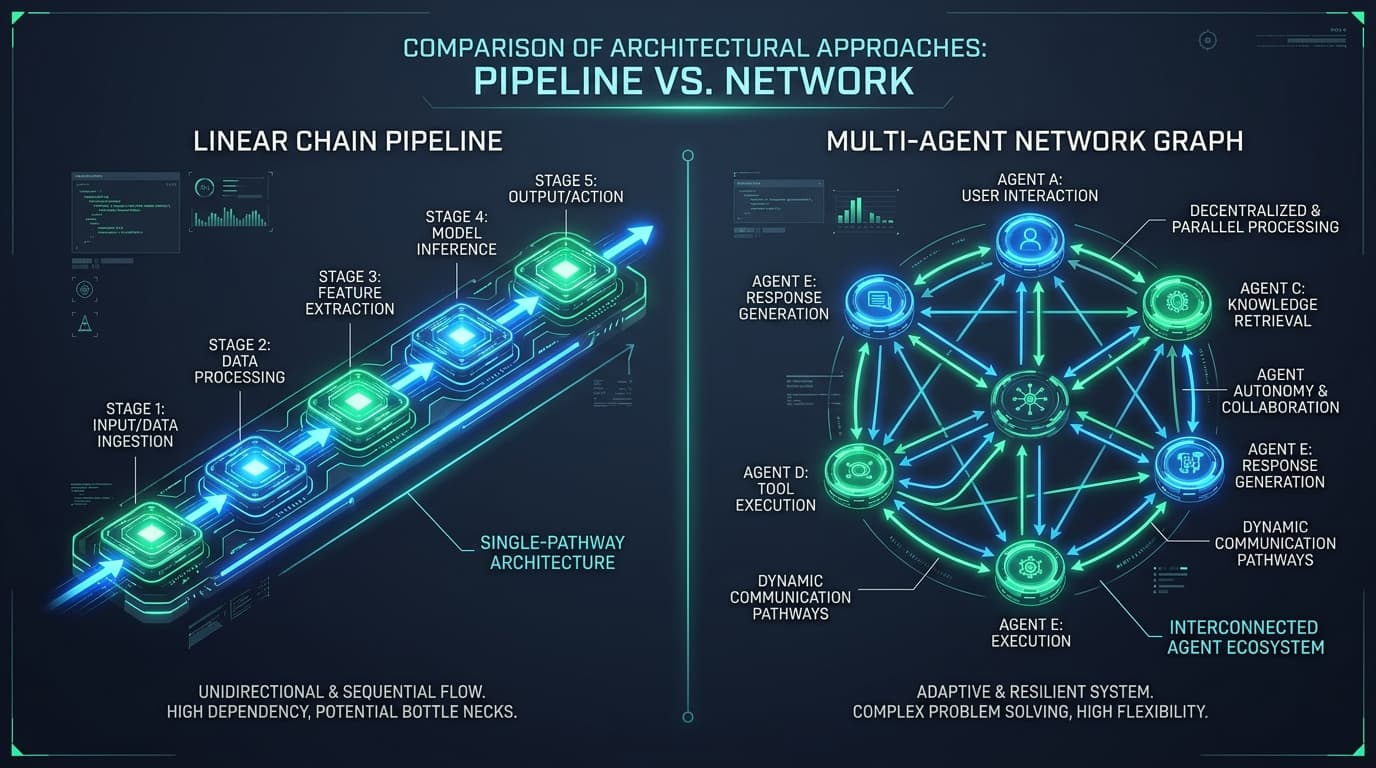
If you have spent even five minutes reading about AI development recently, you've probably seen two names thrown around constantly: LangChain and LangGraph. You might have seen hot takes on social media claiming 'LangChain is dead, just use LangGraph' or tutorials that jump straight into dizzying state diagrams without explaining why you would ever need them in the first place.
The One-Sentence Summary: LangChain is like a straight conveyor belt (Step 1 → Step 2 → Step 3). LangGraph is like an office team room with a whiteboard, where AI workers can loop back, fix mistakes, ask for human approval, and collaborate.
The 30-Second Real-World Analogy
Think about how physical work gets done in the real world:
- LangChain = The Factory Assembly Line: You put raw metal in at the start. Machine 1 shapes it. Machine 2 paints it. Machine 3 puts it in a box. It only moves forward in a straight line. If Machine 2 makes a mistake, the whole belt stops or ships a broken product.
- LangGraph = The Software Engineering Team: An engineer writes code → runs tests → if tests fail, loops back to fix the bug → when tests pass, asks a human manager for review → only merges once approved. Work flows in loops, makes decisions, and remembers context across steps.
What Is LangChain and When Should You Use It?
LangChain was created to make working with Large Language Models (LLMs) easier. Instead of writing dozens of lines of boilerplate code to format prompts, call APIs, and parse JSON responses, LangChain gives you reusable building blocks and lets you connect them into a pipeline using LCEL (LangChain Expression Language).
A typical LangChain workflow is linear (technically called a DAG — Directed Acyclic Graph, meaning it never loops backward):
// Simple LangChain Pipeline (Straight Line: Prompt -> Model -> Output Parser)
import { ChatOpenAI } from "@langchain/openai";
import { PromptTemplate } from "@langchain/core/prompts";
import { StringOutputParser } from "@langchain/core/output_parsers";

const prompt = PromptTemplate.fromTemplate("Summarize this text in 3 bullet points:\n{text}");
const model = new ChatOpenAI({ model: "gpt-4o-mini", temperature: 0 });
const parser = new StringOutputParser();

// Connected like a conveyor belt using the pipe '|' operator
const summaryChain = prompt.pipe(model).pipe(parser);

const result = await summaryChain.invoke({
  text: "LangChain is a framework for developing applications powered by language models..."
});
console.log(result);
Use LangChain when your task is straightforward:
- Document Question & Answering (Standard RAG): Search vector database → give context to LLM → return answer.
- Text Transformation: Translation, summarization, sentiment analysis, or structured JSON extraction.
- One-Shot Tools: Formatting user input and saving it to a database.
Why Was LangGraph Created?
As developers started building real-world autonomous AI agents, they quickly hit a giant brick wall with linear chains. Real intelligence requires trial, error, and feedback. Consider what happens when an AI writes computer code:
- 01The AI generates Python code.
- 02A sandbox executes the code and discovers a syntax error.
- 03The AI must inspect the error message, remember what it tried before, modify the code, and re-run it.
- 04If it fails 3 times in a row, pause and ask a human engineer for guidance.
A traditional chain cannot easily do this because it cannot run in cycles or persist state between decision nodes. That is exactly why Harrison Chase and the LangChain team built LangGraph.
How LangGraph Works in 3 Core Concepts
You don't need a PhD in computer science to understand LangGraph. It is made of just three basic pieces:
- 1. State (The Shared Whiteboard): A central data object that holds the current conversation, variables, tool outputs, and history. Every worker node reads from and writes updates to this state.
- 2. Nodes (The Workers): Plain JavaScript/Python functions that do one specific job (e.g. 'generate_draft', 'execute_sql', 'critique_essay').
- 3. Edges (The Arrows & Decision Rules): The rules that tell the system where to go next. Standard edges go directly to the next node, while conditional edges choose the path based on the current state (e.g., 'if score > 80 go to PUBLISH, else loop back to REVISE').
// Simple LangGraph Workflow with a Self-Correction Loop
import { StateGraph, Annotation, END, START } from "@langchain/langgraph";

// 1. Define the State (Our shared memory)
const AgentState = Annotation.Root({
  code: Annotation<string>,
  error: Annotation<string>,
  iterations: Annotation<number>({
    reducer: (x, y) => y,
    default: () => 0,
  }),
});

// 2. Define our Worker Nodes
async function codeGenerator(state: typeof AgentState.State) {
  console.log("AI is writing/fixing code...");
  // In real life, call LLM to generate or fix code based on state.error
  return { code: "function add(a, b) { return a + b; }", iterations: state.iterations + 1 };
}

async function codeTester(state: typeof AgentState.State) {
  console.log("Testing generated code...");
  // Check if code passes tests
  const passed = state.iterations >= 2; // Simulate passing on 2nd try
  return passed ? { error: "" } : { error: "AssertionError: expected 4 got undefined" };
}

// 3. Define Conditional Routing (The Loop Decision)
function shouldContinue(state: typeof AgentState.State) {
  if (!state.error || state.iterations > 3) {
    return END; // Code passed or max retries reached!
  }
  return "generator"; // Loop back to generator!
}

// 4. Build the Graph
const workflow = new StateGraph(AgentState)
  .addNode("generator", codeGenerator)
  .addNode("tester", codeTester)
  .addEdge(START, "generator")
  .addEdge("generator", "tester")
  .addConditionalEdges("tester", shouldContinue);

const app = workflow.compile();
const finalResult = await app.invoke({ iterations: 0 });
console.log("Final Verified Code:", finalResult.code);LangChain vs LangGraph: Side-by-Side Comparison
- Control Flow: LangChain is strictly Linear (A → B → C). LangGraph is Cyclic (A → B → A → C with loops and branches).
- Error Recovery: LangChain crashes or requires manual try/catch wrappers. LangGraph natively loops back with the error message for self-healing.
- Memory & State: LangChain passes inputs directly to outputs. LangGraph maintains a typed state object with automatic checkpoints and time-travel debugging.
- Multi-Agent Support: LangChain is awkward for multi-agent setups. LangGraph is purpose-built for hierarchical multi-agent teams.
- Human-in-the-Loop: LangChain has no built-in pause mechanism. LangGraph allows pausing execution before any node to wait for user approval or input.
- Ideal Use Case: LangChain for RAG, search, and text summarization. LangGraph for coding agents, multi-step researchers, customer support bots, and autonomous workflows.
The 4-Question Decision Tree: Which One Should You Choose?
- 01Does your AI task need to retry, self-correct, or loop until a condition is met? → Pick LangGraph.
- 02Do you need to pause the execution to get human confirmation before taking a risky action (like charging a credit card or sending an email)? → Pick LangGraph.
- 03Are you building a standard question-answering bot over your company PDFs? → Pick LangChain.
- 04Do you have multiple specialized agents (e.g. Researcher, Coder, Reviewer) talking to one another? → Pick LangGraph.
The Best Part: You don't actually have to choose! LangGraph is not a competitor to LangChain; it is built on top of it. You use LangChain's prompt templates, tool definitions, and model integrations inside your LangGraph worker nodes. They work together seamlessly.
Frequently Asked Questions
Is LangGraph replacing LangChain?
No. LangGraph is a companion library in the LangChain ecosystem. LangChain provides the core primitives (model wrappers, document loaders, vector store integrations), while LangGraph provides the orchestration engine for complex, cyclic agent workflows.
Does LangGraph support TypeScript / JavaScript?
Yes! LangGraph is fully supported in both Python (`langgraph`) and TypeScript/JavaScript (`@langchain/langgraph`) with first-class type safety and identical feature parity.
What is time-travel debugging in LangGraph?
Because LangGraph saves state checkpoints after every node execution, you can rewind an agent's execution to any previous step, modify its state or prompt, and re-run from that exact point to debug issues without restarting from scratch.
Should a beginner start with LangChain or LangGraph?
If you are brand new to LLMs, start with LangChain basics (making an API call, creating a prompt template, and building a simple RAG chain). Once you understand how to call an LLM with tools, step up to LangGraph to build multi-step agents that can loop and make decisions.
Continue reading
Get updates directly in your Google Search feed
Add this publication as a preferred source to highlight articles in Top Stories and AI Overviews.