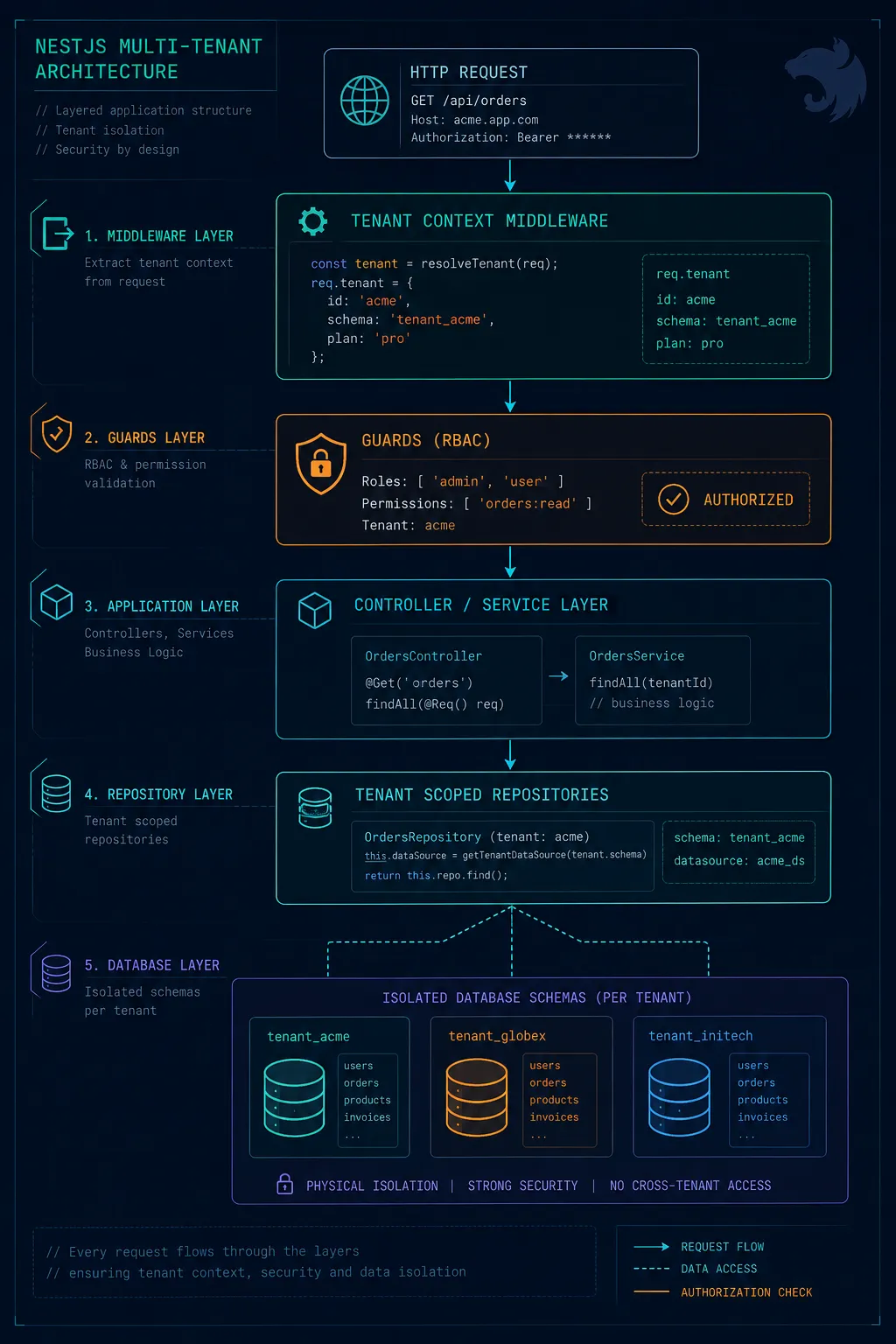
Multi-tenancy is one of those architectural problems that looks deceptively simple on paper. You add a tenantId column, filter every query, ship it. Then six months later you're debugging a production incident where Tenant A briefly saw Tenant B's billing data because one developer forgot a WHERE clause. I've built multiple SaaS backends in NestJS — including a gate and garage access control platform with strict per-tenant isolation — and this is the architecture I keep coming back to. Not because it's clever, but because it's the one that doesn't fail silently.
TL;DR — Multi-tenant NestJS backends fail silently when tenantId scoping is left to individual developers. Row-level security + a TenantGuard that runs before every resolver is the architecture that makes isolation bulletproof by default.
First, Pick Your Isolation Model — This Decision Is Irreversible
Every other architectural decision flows from this one, so you need to make it deliberately before writing a single NestJS module. There are three patterns, and they exist on a spectrum of isolation vs. operational complexity:
- Shared Database, Shared Schema: All tenants share tables, every row has a tenantId foreign key. Cheapest to run, hardest to secure correctly. One missed WHERE clause is a data breach.
- Shared Database, Separate Schemas: Each tenant gets their own Postgres schema (e.g., tenant_acme.users vs tenant_beta.users) within the same database instance. Good middle ground — queries are automatically scoped by schema, migrations are tenant-specific, but you're still on shared infrastructure.
- Database per Tenant: Each tenant gets their own database. Maximum isolation and the only model that satisfies SOC 2 Type II requirements for enterprise clients out of the box. Operationally expensive — connection pooling becomes a serious engineering problem at scale.
My default recommendation: start with shared database + separate schemas. It buys you real isolation without the connection management nightmare of database-per-tenant. When an enterprise client demands a dedicated database, you have a clear upgrade path rather than a rewrite.
Injecting Tenant Context Before Anything Else Runs
The biggest mistake I see is handling tenant resolution inside controllers or service methods. By the time your business logic runs, the tenant context should already be resolved, validated, and available as a first-class citizen. In NestJS, middleware is the right place for this — it runs before guards, interceptors, and controllers.
// tenant.middleware.ts
import { Injectable, NestMiddleware, UnauthorizedException } from '@nestjs/common';
import { Request, Response, NextFunction } from 'express';
import { TenantService } from './tenant.service';

@Injectable()
export class TenantMiddleware implements NestMiddleware {
  constructor(private readonly tenantService: TenantService) {}

  async use(req: Request, res: Response, next: NextFunction) {
    // Resolve tenant from subdomain, custom header, or JWT claim
    const tenantId =
      req.headers['x-tenant-id'] as string ||
      this.extractFromSubdomain(req.hostname);

    if (!tenantId) throw new UnauthorizedException('Tenant not identified');

    const tenant = await this.tenantService.findById(tenantId);
    if (!tenant || !tenant.isActive) {
      throw new UnauthorizedException('Tenant is inactive or not found');
    }

    req['tenant'] = tenant; // attach to request lifecycle
    next();
  }

  private extractFromSubdomain(hostname: string): string | null {
    const parts = hostname.split('.');
    return parts.length >= 3 ? parts[0] : null;
  }
}
Register this middleware globally in your AppModule for every route that sits behind authentication. Public routes like health checks and webhook callbacks should be explicitly excluded.
// app.module.ts
export class AppModule implements NestModule {
  configure(consumer: MiddlewareConsumer) {
    consumer
      .apply(TenantMiddleware)
      .exclude(
        { path: 'health', method: RequestMethod.GET },
        { path: 'webhooks/(.*)', method: RequestMethod.POST },
      )
      .forRoutes('*');
  }
}A Custom Decorator to Pull Tenant from the Request
Once the middleware attaches tenant context to the request object, you want to access it in controllers without repeating boilerplate. A simple parameter decorator handles this cleanly:
// current-tenant.decorator.ts
import { createParamDecorator, ExecutionContext } from '@nestjs/common';

export const CurrentTenant = createParamDecorator(
  (data: unknown, ctx: ExecutionContext) => {
    const request = ctx.switchToHttp().getRequest();
    return request.tenant;
  },
);

// Usage in a controller:
@Get('devices')
getDevices(@CurrentTenant() tenant: Tenant) {
  return this.devicesService.findAll(tenant.id);
}RBAC That Actually Scales: Roles, Resources, and Actions
Flat role checks like isAdmin() break down fast once you have more than three user types. In a real SaaS backend, you need to think in terms of three dimensions: who the user is (role), what they're acting on (resource), and what they want to do (action). This is the RBAC model I use in production.
// permission.enum.ts
export enum Action {
  Create = 'create',
  Read = 'read',
  Update = 'update',
  Delete = 'delete',
  Manage = 'manage', // wildcard — full control
}

export enum Resource {
  Users = 'users',
  Devices = 'devices',
  AuditLog = 'audit_log',
  BillingSettings = 'billing_settings',
}

// permission.decorator.ts
import { SetMetadata } from '@nestjs/common';
export const PERMISSIONS_KEY = 'permissions';
export const RequirePermission = (resource: Resource, action: Action) =>
  SetMetadata(PERMISSIONS_KEY, { resource, action });
The guard reads that metadata and checks it against the user's permissions for the current tenant. Notice the tenant-scoping here — a user might have Admin on Tenant A and ReadOnly on Tenant B. Their role is always evaluated in context:
// permissions.guard.ts
@Injectable()
export class PermissionsGuard implements CanActivate {
  constructor(private reflector: Reflector, private rbacService: RbacService) {}

  async canActivate(context: ExecutionContext): Promise<boolean> {
    const required = this.reflector.get<{ resource: Resource; action: Action }>(
      PERMISSIONS_KEY,
      context.getHandler(),
    );
    if (!required) return true; // no permission requirement = public handler

    const request = context.switchToHttp().getRequest();
    const { user, tenant } = request;

    return this.rbacService.userCan(user.id, tenant.id, required.resource, required.action);
  }
}
Never evaluate permissions without the tenant context. A user's role is always relative to a specific tenant. Evaluating permissions tenant-agnostically is how cross-tenant escalation bugs are born.
Scoped Repositories: Making Data Leaks Structurally Impossible
The most valuable pattern I've found for shared-schema multi-tenancy is a scoped repository that automatically injects the tenantId into every query. Instead of relying on every developer to remember the WHERE clause, you make it physically impossible to query without it.
// base-tenant.repository.ts
import { Repository, DataSource, ObjectLiteral, EntityTarget } from 'typeorm';

export class TenantScopedRepository<T extends ObjectLiteral> {
  private repo: Repository<T>;

  constructor(entity: EntityTarget<T>, private dataSource: DataSource, private tenantId: string) {
    this.repo = this.dataSource.getRepository(entity);
  }

  findAll(options?: object) {
    return this.repo.find({ where: { tenantId: this.tenantId, ...options } as any });
  }

  findOne(id: string) {
    return this.repo.findOne({ where: { id, tenantId: this.tenantId } as any });
  }

  create(data: Partial<T>) {
    const entity = this.repo.create({ ...data, tenantId: this.tenantId } as any);
    return this.repo.save(entity);
  }

  async delete(id: string) {
    // Double-check tenant ownership before delete — never trust the ID alone
    const entity = await this.findOne(id);
    if (!entity) throw new NotFoundException(`Resource ${id} not found in this tenant`);
    return this.repo.remove(entity);
  }
}
In your service layer, you inject this scoped repository using NestJS's REQUEST scope, so each HTTP request gets a repository instance bound to that request's tenant:
// devices.service.ts
@Injectable({ scope: Scope.REQUEST })
export class DevicesService {
  private deviceRepo: TenantScopedRepository<Device>;

  constructor(
    @Inject(REQUEST) private request: Request,
    private dataSource: DataSource,
  ) {
    const tenantId = (request as any).tenant.id;
    this.deviceRepo = new TenantScopedRepository(Device, dataSource, tenantId);
  }

  findAll() {
    return this.deviceRepo.findAll();
  }
}Admin Dashboard Considerations: Scoped Data and Audit Logs
The admin dashboard is where multi-tenant architectures most commonly fall apart. You typically have two distinct user types: tenant admins (who manage their own tenant) and super admins (platform operators who need visibility across all tenants). These are fundamentally different security contexts and should be served from different API surfaces.
- Tenant Admin routes: Always pass through TenantMiddleware. Every query is automatically scoped. The tenant admin cannot escape their scope even if they manipulate request headers.
- Super Admin routes: Live under a separate /admin prefix, protected by a SuperAdminGuard that checks a platform-level role, not a tenant-level role. These routes are explicitly allowed to query cross-tenant.
- Never mix them: A single 'admin' flag that bypasses tenant scoping is an escalation vulnerability waiting to happen.
Audit logging is non-negotiable in a SaaS backend. Every write operation — creates, updates, deletes — should produce an audit record. I do this with a NestJS interceptor rather than spreading audit.log() calls across service methods:
// audit.interceptor.ts
@Injectable()
export class AuditInterceptor implements NestInterceptor {
  constructor(private auditService: AuditService) {}

  intercept(context: ExecutionContext, next: CallHandler): Observable<any> {
    const request = context.switchToHttp().getRequest();
    const { user, tenant, method, url } = request;

    if (['POST', 'PUT', 'PATCH', 'DELETE'].includes(method)) {
      return next.handle().pipe(
        tap((response) => {
          this.auditService.log({
            tenantId: tenant.id,
            userId: user.id,
            action: method,
            resource: url,
            timestamp: new Date(),
          });
        }),
      );
    }

    return next.handle();
  }
}Production Gotchas I've Learned the Hard Way
REQUEST Scope Has a Performance Cost
Using Scope.REQUEST means NestJS re-instantiates your service (and its entire dependency tree) on every HTTP request. For high-throughput routes, this matters. Profile before going all-in on request-scoped providers. A common optimization is to pass the tenantId explicitly as a method parameter in performance-critical services rather than injecting it via scope.
Rate Limiting Must Be Per-Tenant, Not Global
A global rate limit lets one misbehaving tenant degrade service for everyone. Use @nestjs/throttler with a custom storage key that includes the tenantId:
// In your ThrottlerGuard override:
protected getTracker(req: Record<string, any>): Promise<string> {
  const tenantId = req.tenant?.id ?? 'anonymous';
  const ip = req.ip;
  return Promise.resolve(`${tenantId}:${ip}`);
}
Migrations Need Tenant Awareness
If you're on shared schema, adding a non-nullable column requires a default value or a multi-step migration (add nullable, backfill, add NOT NULL constraint). If you're on schema-per-tenant, you need a migration runner that iterates across every tenant schema. Build this tooling early — retrofitting it onto a production system with 200 tenants is painful.
Onboarding New Tenants Is an API, Not a Script
Tenant provisioning — creating the database schema, seeding default roles, setting up billing hooks — should be a programmatic NestJS service, not a one-off bash script. This lets you expose a self-serve signup flow, trigger it from webhooks (Stripe payment confirmed → provision tenant), and test it in your CI pipeline.
If provisioning a new tenant requires someone to SSH into a server and run a script, you don't have a SaaS product yet — you have a managed service with extra steps.
The Architecture in One View
- 01Request arrives → TenantMiddleware resolves and validates tenant from subdomain or header, attaches to request
- 02AuthGuard validates JWT, extracts user, confirms user belongs to the resolved tenant
- 03PermissionsGuard checks the user's role within that tenant against the route's required permission
- 04Controller extracts tenant via @CurrentTenant() decorator, passes tenantId into service
- 05TenantScopedRepository executes all queries with tenantId automatically injected
- 06AuditInterceptor records every write operation asynchronously
- 07Rate limiter enforces per-tenant request limits to prevent noisy-neighbor problems
Final Thoughts
The common thread in all of this is making correct behavior the path of least resistance. When tenant context flows automatically through middleware, when repositories scope queries without any developer effort, and when RBAC is enforced at the guard layer before business logic even runs — developers stop having to think about isolation. They can focus on features. The architecture does the security work.
Multi-tenant SaaS backends aren't fundamentally hard. They're just unforgiving of architectural shortcuts taken early. Pick your isolation model deliberately, enforce tenant context at the edge of your system, and build your data access layer so that leaking data across tenants is structurally impossible — not just a convention everyone agrees to follow.
The best multi-tenant architecture is one where a developer has to go out of their way to write a cross-tenant query — not the other way around.
Need an AI engineer for your project? I build RAG systems, LLM integrations, AI agents, and SaaS backends. Reach me at prayagbagthariya.vercel.app/hire-me or prayag129787@gmail.com.
Frequently Asked Questions
What is multi-tenancy in NestJS and why does it matter?
Multi-tenancy is an architecture where a single application instance serves multiple independent customers (tenants), with strict data isolation between them. In NestJS, it matters because the framework's modular structure makes it possible to enforce tenant context at the middleware layer, ensuring every database query is automatically scoped to the correct tenant without relying on developers to remember a WHERE clause.
What is the difference between shared schema and separate database multi-tenancy?
In shared schema, all tenants share the same tables and rows are distinguished by a tenantId column — simpler to operate but highest risk of data leaks. In separate database, each tenant gets their own database — maximum isolation but more complex infrastructure. Separate schema (one schema per tenant in the same database) is a middle ground. This decision is irreversible once you have production data, so it must be made deliberately upfront.
How do you implement tenant context in NestJS?
Using a middleware that extracts the tenant identifier from the request (subdomain, header, or JWT claim) and attaches it to the request object. A custom REQUEST-scoped provider then exposes that context to your services and repositories. The key is making this automatic — developers should never have to manually pass tenant context through function arguments.
What is RBAC and how does it work in a multi-tenant NestJS app?
Role-Based Access Control (RBAC) assigns permissions to roles rather than individual users. In a multi-tenant system, roles are always scoped per tenant — a user can be an Admin in Tenant A and a Viewer in Tenant B. In NestJS, this is implemented with Guards that check both the tenant context and the user's role within that tenant before allowing access to any endpoint.
How do you prevent data leaks between tenants in production?
The safest approach is to make cross-tenant queries structurally impossible — using a base repository class that automatically appends the tenant scope to every query, rather than relying on developers to remember. Combined with integration tests that assert tenant isolation for every data access pattern, and audit logging that flags any query without a tenant scope, data leaks become architectural violations rather than human errors.
Continue reading

Why "Vibe Coding" Feels Like Flying Until You Hit Production: A Brutally Honest Field Guide for 2026

Why Insurtech Still Runs on Java: What Building US Retirement Engines Taught Me About Architecture, Rust, and Why India Got It Right
Get updates directly in your Google Search feed
Add this publication as a preferred source to highlight articles in Top Stories and AI Overviews.