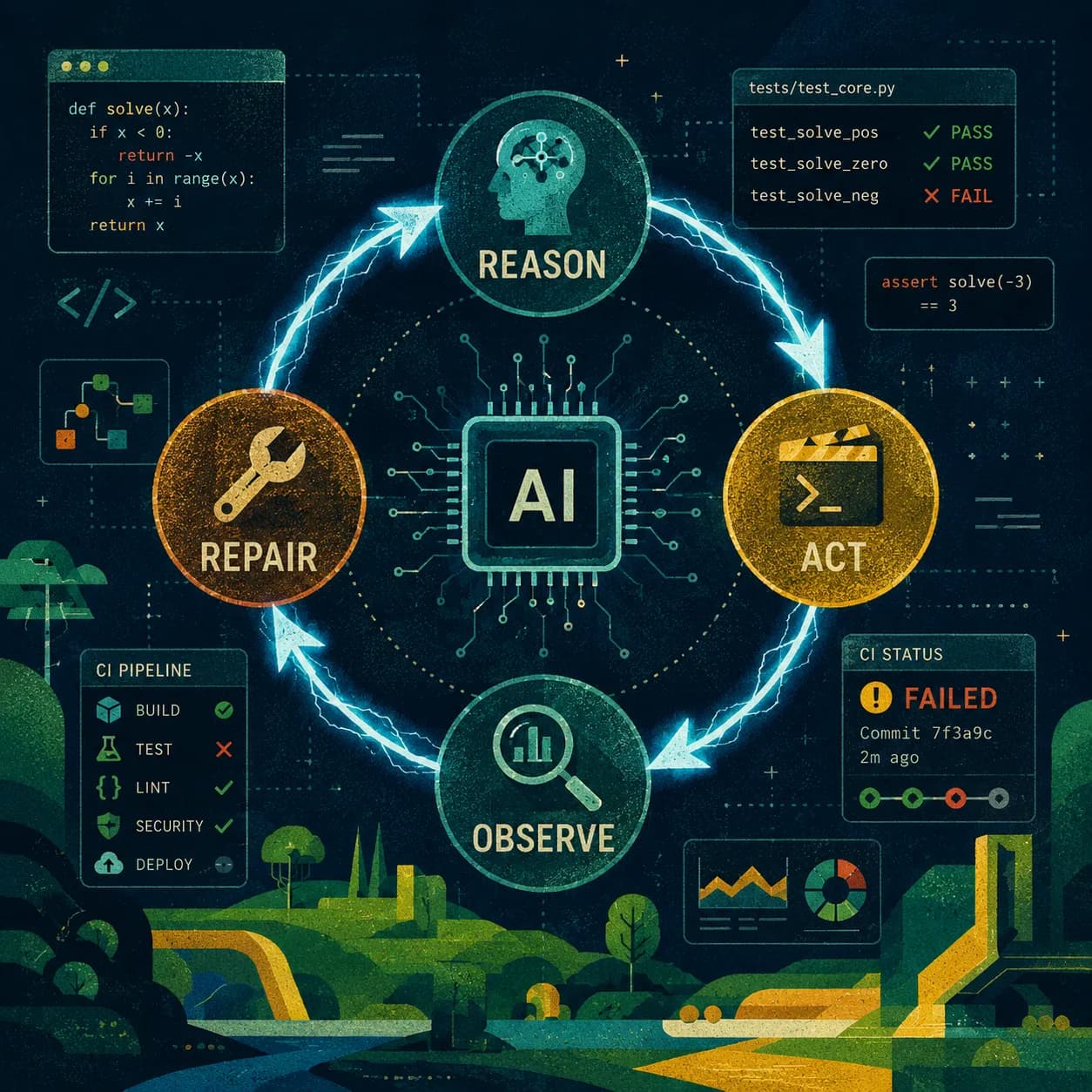
In June 2026, Anthropic reported that over 80% of the code merged into production at the company was authored by Claude. Not assisted — authored. That statistic isn't a curiosity. It's a signal that the most productive developers have stopped optimizing their prompts and started engineering their loops. Loop engineering is the practice of designing automated systems where AI agents reason, act, observe feedback, and repair — repeatedly, without you babysitting each step. If you're still manually prompting an agent for every task, you're doing prompt engineering. If you're designing the harness that orchestrates the agent, you're doing loop engineering. The gap in output between the two approaches is not incremental.
TL;DR — Stop prompt engineering. Start loop engineering. Design AI agent systems that reason, act, observe feedback, and self-repair automatically — the gap in output vs. manual prompting is not incremental.
What Is a Loop, Exactly?
A loop is a cycle with four phases: reason (plan what to do), act (make a change), observe (collect feedback from the environment), and repair (fix what failed). Without all four, you don't have a loop — you have a one-shot prompt. The difference is that a one-shot prompt ends when the agent responds. A loop ends when the verification passes.
This is the central insight of loop engineering: feedback is what makes a loop trustworthy. An agent that writes code and immediately succeeds is an agent agreeing with itself. An agent that writes code, runs the test suite, sees three failures, diagnoses the root cause, fixes them, and re-runs until green — that's an agent doing useful work. The tests are what separate execution from guessing.
Without feedback gates, a coding agent loop is just an agent confidently agreeing with itself. Tests, type checks, and lint rules are not obstacles — they are the mechanism that makes the loop self-correcting.
The Two Loops Every Developer Already Has
Before we talk about AI agents, it's worth understanding the two feedback loops you're already running every day, because AI agents plug into both of them.
The Inner Loop: Your Local Development Cycle
The inner loop is what happens between opening your editor and pushing a commit. You write code, run the dev server, check the output, run a few tests, and iterate. A healthy inner loop takes 3–5 minutes per cycle. At that pace, you get 70+ iterations in a working day. When the inner loop grows to 10 minutes, that drops to 40 iterations. The compounding effect on what you can build in a week is brutal.
- Vite HMR: module changes visible in the browser in under 100ms — the inner loop at its fastest
- Vitest watch mode: re-runs only affected tests on file save, keeps feedback local and instant
- TypeScript incremental compilation: only re-checks files that changed since last build
- Pre-commit hooks: lint and type-check before the commit lands, not after CI fails 10 minutes later
The Outer Loop: Your CI/CD Pipeline
The outer loop runs on push — full test suite, build, integration checks, deployment. It's necessarily slower than the inner loop, but its length determines how long you wait between shipping a change and knowing it's safe. Google's internal research is clear: developers strongly prefer CI pipelines under 10 minutes above almost any other tooling improvement. At 20+ minutes, pipeline waits cause context switches — and each context switch costs roughly 20 minutes of refocus time.
Most teams accept slow outer loops as a fact of life. They're not. They're an engineering problem with well-understood solutions.
Optimizing the Inner Loop: Faster Feedback Locally
Swap Your Build Toolchain
The single highest-leverage change most JavaScript/TypeScript teams can make is replacing Babel and Webpack with Rust/Go-based alternatives. The performance differences are not marginal.
- SWC: 20x faster than Babel single-threaded, 70x faster on four cores — drop-in replacement for transpilation
- esbuild: 10–100x faster than Webpack — Go-based bundler + minifier in a single pass
- Vite: uses native ES modules in dev (zero bundling), esbuild for dependency pre-bundling, Rollup for production — cold starts under 1 second on large projects
If your project bootstrapped with Create React App or an older Next.js config that still uses Babel, migrating to SWC is usually a half-day of work that buys back 30–60 seconds on every inner loop iteration for the rest of the project's life.
Pre-Commit Hooks: Fast or Useless
Pre-commit hooks are feedback at the earliest possible moment in the loop — before the code even leaves your machine. But there's a hard rule: if a hook takes more than 500ms, developers start bypassing it with --no-verify. A hook that gets skipped is worse than no hook at all, because it creates false confidence.
// .husky/pre-commit — keep it surgical, not comprehensive
{
  "lint-staged": {
    "*.{ts,tsx}": [
      "eslint --fix --max-warnings=0",
      "prettier --write"
    ],
    "*.{ts,tsx,js}": "tsc --noEmit --incremental"
  }
}
The key principle: pre-commit hooks should only check what changed. Running ESLint on every file in the repo on every commit is a mistake. lint-staged runs linting only on staged files — the difference on a large project is 3 seconds vs 45 seconds. Anything that takes minutes belongs in CI, not pre-commit.
- Pre-commit (< 30s): lint staged files, format, fast type check
- Pre-push (< 2 min): unit tests for changed packages, slower type checks
- CI (time-budgeted): full test suite, integration tests, E2E, security scans
Optimizing the Outer Loop: CI That Doesn't Punish You
Affected Builds in Monorepos
If you're running a monorepo and your CI builds every package on every push, you're burning time proportional to repo size rather than proportional to change size. Turborepo and Nx solve this with affected build graphs — they analyze exactly which packages changed and which packages depend on those packages, then only rebuild and retest what's actually affected.
// turbo.json
{
  "$schema": "https://turbo.build/schema.json",
  "pipeline": {
    "build": {
      "dependsOn": ["^build"],
      "outputs": [".next/**", "dist/**"]
    },
    "test": {
      "dependsOn": ["build"],
      "inputs": ["src/**/*.ts", "src/**/*.tsx", "test/**"],
      "outputs": ["coverage/**"]
    },
    "lint": {
      "inputs": ["src/**/*.ts", "src/**/*.tsx", ".eslintrc*"]
    }
  },
  "remoteCache": {
    "enabled": true
  }
}
With remote caching enabled, build artifacts and test results are stored in a shared cache. When a CI run hits the same input hash as a previous run, it restores the cached output in seconds rather than rebuilding. Teams running Turborepo with remote caching report cache hit rates climbing from around 45% to over 90% within a few weeks as the cache warms up.
Test Sharding: Parallelize Across Machines
If your full test suite takes 20 minutes, sharding across 4 CI workers brings that to 5 minutes. Vitest and Jest both support file-level sharding — each worker runs a distinct subset of test files.
# .github/workflows/test.yml
jobs:
  test:
    strategy:
      matrix:
        shard: [1, 2, 3, 4]
    steps:
      - uses: actions/checkout@v4
      - uses: actions/setup-node@v4
      - run: npm ci
      - run: npx vitest run --reporter=junit --shard=${{ matrix.shard }}/4
        env:
          VITEST_JUNIT_OUTPUT: test-results/shard-${{ matrix.shard }}.xml
      - uses: actions/upload-artifact@v4
        with:
          name: test-results-${{ matrix.shard }}
          path: test-results/
Docker Layer Caching in GitHub Actions
Docker builds that reinstall dependencies from scratch on every CI run are a common and avoidable time sink. Multi-stage builds with layer caching via GitHub's gha backend can take a 12-minute Docker build to 4 minutes. The key is structuring your Dockerfile so that frequently-changed layers (application code) come after stable layers (base image, dependency installation).
# .github/workflows/build.yml
- name: Build and push Docker image
  uses: docker/build-push-action@v5
  with:
    context: .
    push: true
    tags: myapp:latest
    cache-from: type=gha
cache-to: type=gha,mode=max# Dockerfile — order layers from stable to volatile
FROM node:20-alpine AS deps
WORKDIR /app
# This layer only rebuilds when lockfile changes
COPY package.json package-lock.json ./
RUN npm ci --only=production
FROM node:20-alpine AS builder
WORKDIR /app
COPY --from=deps /app/node_modules ./node_modules
# This layer rebuilds on every source change
COPY . .
RUN npm run build
FROM node:20-alpine AS runner
WORKDIR /app
COPY --from=builder /app/.next ./.next
COPY --from=deps /app/node_modules ./node_modules
CMD ["node", "server.js"]The most impactful CI optimization is almost always cache strategy, not parallelism. If your cache hit rate is low, adding more parallel workers is just failing faster. Fix the cache first.
Now Add the AI Agent Loop
Once your inner and outer loops are optimized — fast local feedback, sub-10-minute CI — you have a foundation that an AI coding agent can actually exploit. A slow feedback loop punishes AI agents even harder than it punishes humans, because agents iterate rapidly and waste each iteration waiting for a slow test suite.
The Agent Loop Structure
A well-designed agent loop for a coding task looks like this: the agent reads the task, plans an approach, searches the relevant codebase, makes the change, runs verification (tests, type checks, lint), reads the output, and if verification fails, diagnoses the failure and repairs. This cycle repeats until verification passes — or until a defined budget (time, iteration count) is exhausted.
- 01Reason: Parse the task, identify affected files, plan the change
- 02Act: Write the code change — scoped to the minimum necessary
- 03Observe: Run the verification suite — tests, tsc, eslint
- 04Repair: If verification fails, read the error output, diagnose, fix — go to step 2
- 05Done: Verification passes — commit, open PR, notify
The critical design decision is step 3: what does 'verification' mean for your repo? This is where most loop engineering implementations fail. Teams set up the agent loop but leave verification as 'the agent thinks it's done.' That's not a loop — that's a one-shot prompt with extra steps.
Designing Verification Gates
Verification gates are the feedback mechanism that makes the loop trustworthy. The more specific your gates, the better the loop performs. Good verification gates are programmatic — they produce clear pass/fail output the agent can parse and act on.
- Type safety gate: tsc --noEmit — fails with specific file + line + error for the agent to target
- Unit test gate: vitest run --reporter=verbose -- the affected test files only, not the full suite
- Lint gate: eslint --fix on changed files, then eslint --max-warnings=0 to verify no unfixable violations
- Build gate: npm run build — confirms the change doesn't break the production build
- Contract gate: API schema validation, OpenAPI diff — confirms no breaking changes to interfaces
// Example: agent verification script your loop can call after each change
import { execSync } from 'child_process'

interface VerificationResult {
  passed: boolean
  gate: string
  output: string
}

export function runVerification(changedFiles: string[]): VerificationResult[] {
  const results: VerificationResult[] = []

  // Gate 1: Type check
  try {
    execSync('npx tsc --noEmit --incremental', { stdio: 'pipe' })
    results.push({ passed: true, gate: 'typecheck', output: '' })
  } catch (e: any) {
    results.push({ passed: false, gate: 'typecheck', output: e.stdout.toString() })
  }

  // Gate 2: Run tests only for changed files
  const testPattern = changedFiles
    .filter(f => f.endsWith('.ts') || f.endsWith('.tsx'))
    .map(f => f.replace('src/', '').replace('.ts', ''))
    .join('|')

  if (testPattern) {
    try {
      execSync(`npx vitest run --reporter=verbose ${testPattern}`, { stdio: 'pipe' })
      results.push({ passed: true, gate: 'tests', output: '' })
    } catch (e: any) {
      results.push({ passed: false, gate: 'tests', output: e.stdout.toString() })
    }
  }

  return results
}
Multi-Agent Loops: Separating Roles
Single-agent loops hit a ceiling. The same agent that wrote the code reviewing its own code is structurally biased toward approving it. The emerging pattern in production loop engineering is role separation: a coder agent writes the change, a reviewer agent critiques it for correctness and style, a test-writer agent adds missing coverage, and a monitor agent watches for regressions in CI.
Each agent in the loop gets a constrained, focused task. The coder doesn't review. The reviewer doesn't write. The orchestrator routes work between them and decides when the loop's exit condition is satisfied. This mirrors how senior engineering teams actually work — and it produces better output from AI for the same reason.
GitHub Copilot code review now handles 1 in 5 code reviews on the platform. The developers who benefit most aren't using it to rubber-stamp PRs — they're using it as an always-available first reviewer so human reviewers spend their time on architecture and edge cases, not style and obvious bugs.
Implementing Loop Engineering in Your Repo: A Practical Checklist
Here's the sequence I follow when introducing loop engineering into an existing repo. Don't skip to step 5 before steps 1–4 are solid — a fast agent on a slow feedback loop is just producing wrong code faster.
- 01Measure your loops first. Time your inner loop (code change to local test pass) and outer loop (push to CI green). Write them down. You need a baseline to know if your improvements are working.
- 02Tighten your inner loop. Migrate to Vite/SWC if you haven't. Enable TypeScript incremental compilation. Set up lint-staged pre-commit hooks that only check changed files.
- 03Tighten your outer loop. Add Turborepo or Nx affected builds if you're in a monorepo. Add GitHub Actions caching for node_modules and build artifacts. Shard your test suite if it takes more than 10 minutes.
- 04Define your verification gates explicitly. Write down what 'done' means for a code change in your repo. Automate those checks so they produce machine-readable output (exit codes, structured logs).
- 05Introduce the agent loop. Start with a single, well-scoped task type — bug fixes, dependency updates, or boilerplate generation. Let the agent run your verification gates and observe how it handles failures.
- 06Add the reviewer layer. Once the coder loop is stable, add an AI review step before the PR is opened. Treat Copilot or a review-focused model as your first line of review, not your last.
- 07Measure again. Compare inner/outer loop times and PR cycle times against your baseline. Loop engineering should be producing measurable results within 2–3 weeks of implementation.
The Cognitive Load Argument
There's a reason this matters beyond raw output metrics. Research on developer productivity is consistent: 20% of cognitive capacity is lost per context switch, and it takes over 20 minutes to fully refocus after an interruption. The average developer switches tasks 13 times per hour. A slow CI pipeline doesn't just waste clock time — it forces context switches that fragment the entire working day.
Loop engineering, at its best, reduces the number of times a developer has to consciously switch context. When the inner loop is fast enough to stay in flow, when CI comes back in 5 minutes instead of 25, when the AI agent handles the repair cycle on a failing test — the developer's limited attention gets reserved for the decisions that actually require human judgment: architecture, product tradeoffs, edge case reasoning.
That's not a productivity argument. It's a quality argument. The code that gets shipped by a developer who wasn't context-switched 13 times that day is better code.
What Loop Engineering Is Not
It's worth being clear about what this isn't. Loop engineering is not about removing developers from the process. It's not about letting AI agents merge to production unsupervised. The loops that work in production have humans at two specific points: defining the task (what does 'done' look like?) and approving the output (does this PR actually do what it claims?). Everything between those two points is what the loop handles.
The developers who will get the most from AI agents in the next few years aren't the ones who write the best prompts. They're the ones who design the best harnesses — fast feedback loops, precise verification gates, and clear definitions of done. The agent is the worker. The loop is the quality control system. Loop engineering is the craft of designing quality control systems for AI workers.
The shift is from 'I am the loop' — where you manually check each step — to 'I designed the loop' — where the system checks itself and you review the result. That shift is where the 10x productivity gains actually live.
Need an AI engineer for your project? I build RAG systems, LLM integrations, AI agents, and SaaS backends. Reach me at prayagbagthariya.vercel.app/hire-me or prayag129787@gmail.com.
Frequently Asked Questions
What is loop engineering for AI coding agents?
Loop engineering is the practice of designing automated systems where AI agents reason, act, observe feedback, and repair — repeatedly, without manual intervention. Unlike prompt engineering which optimizes individual prompts, loop engineering focuses on the harness that orchestrates the agent, including verification gates like tests and type checks that make the loop self-correcting.
How is loop engineering different from prompt engineering?
Prompt engineering optimizes single AI interactions — you write a better prompt and get a better response. Loop engineering designs the system around the AI: the feedback loops, verification gates, and repair mechanisms that let an agent run autonomously through multiple iterations until the output is verified correct. The productivity gap between the two approaches is not incremental.
What feedback gates should an AI coding agent loop include?
At minimum: a test suite (unit and integration), TypeScript type checking, and a linter. The agent should run all three after every change and only exit the loop when all pass. More advanced loops include end-to-end tests, security scans, and performance benchmarks as additional gates.
When does an AI agent loop need a human in the process?
Humans are most valuable at two points: defining the task (what does 'done' look like, including acceptance criteria) and reviewing the output (does the PR actually do what it claims?). Everything between those two points — writing code, running tests, fixing failures, iterating — is what the loop handles autonomously.
What tools are best for setting up an AI coding agent loop?
Claude Code is purpose-built for agentic coding loops. For CI integration, GitHub Actions with a feedback reporting step works well. Vitest or Jest for the test gate, TypeScript compiler for type checking, and ESLint for lint rules. The key is ensuring all feedback is machine-readable so the agent can parse and act on failures without human translation.
Continue reading

Get updates directly in your Google Search feed
Add this publication as a preferred source to highlight articles in Top Stories and AI Overviews.